Note: This article reflects my professional experience designing and operating cloud network security for large organisations. It is not official guidance from any vendor, and vendors may have different best practices. The goal here is to describe what consistently works in real Azure environments, not to promote one product over another. This analysis focuses on Next-Generation Firewalls (NGFWs) from Palo Alto Networks, Fortinet, and Check Point, as these are the leading platforms most commonly adopted and scaled across the large enterprises I consult with.
Recently I wrote a post about using the same NGFW vendor you trust on-premises in Azure as well. That article sparked a lot of interest — and also some pushback.
A recurring question was:
“But what about dynamic access? Developers want Azure Firewall so they can write their own rules.”
This post is my answer to that question.
Firewalls in Azure can be used in a much smarter, more cloud-aware way. Most vendors simply haven’t done a great job showcasing what’s possible. And many organisations still operate cloud firewalls like static appliances in a datacenter.
This article shows how to use Azure-native metadata, modern NGFW functionality, and intelligent policy design to move away from static IP lists and toward a metadata-driven, dynamic policy model that requires less maintenance, scales better, and gives Landing Zone (LZ) teams more control — without compromising security.
This post is vendor-agnostic. The vendor-specific configuration examples will come in a separate follow-up article.
Azure Metadata + NGFW Dynamic Objects
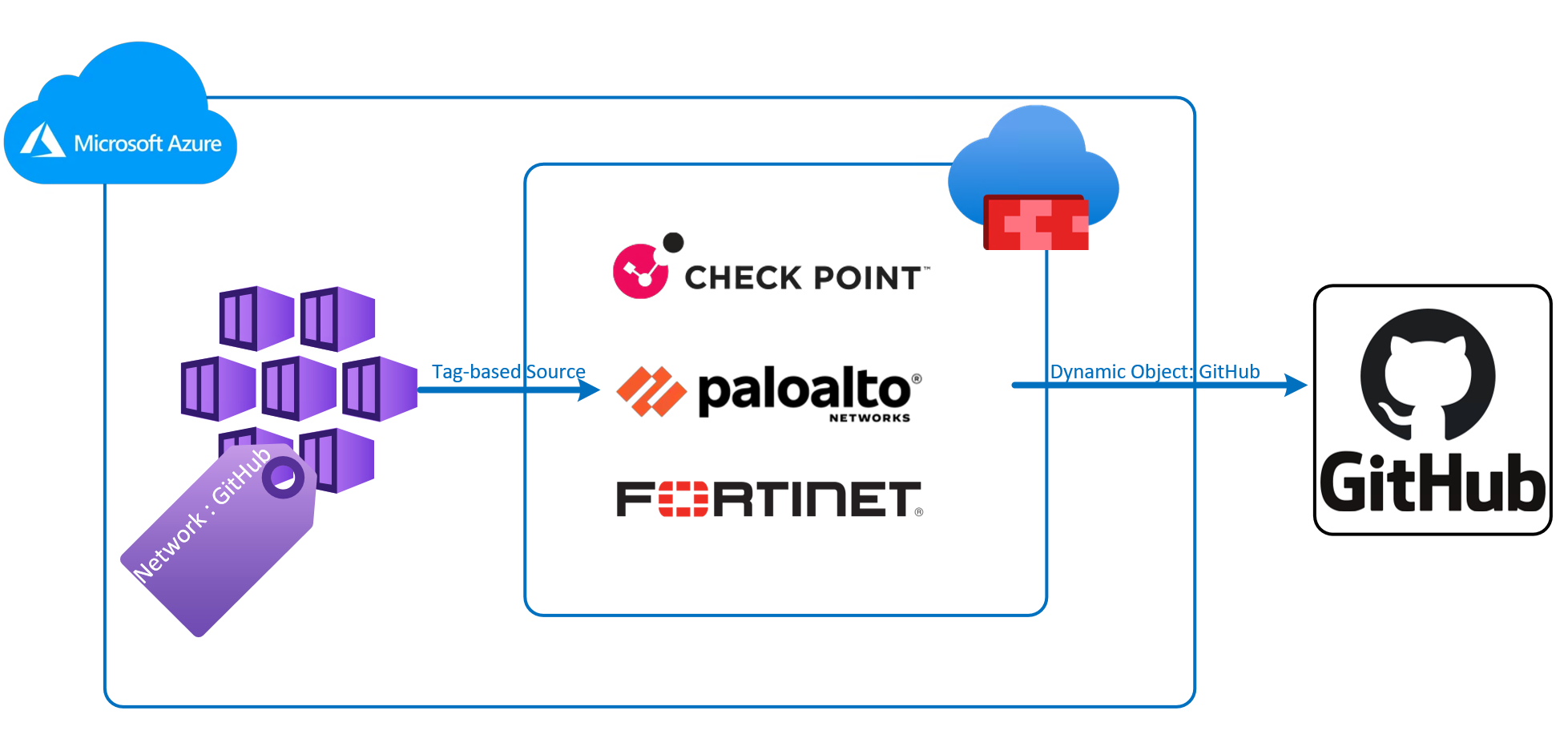
All major NGFWs now support some variation of Azure tag syncing:
- Dynamic address groups / objects
- Updatable SaaS and internet service objects
- Service principals for Azure Resource Graph integration
The pattern is the same everywhere:
Give the firewall a service principal with Reader access → it queries Azure → it maps resources and tags → it builds dynamic objects.
Requirements:
Check Point → CloudGuard Controller
Fortinet → Azure SDN Connector
Palo Alto → VM Monitoring
This becomes the foundation for cloud-native policy.
Using Azure Tags as the Source in Firewall Rules
Tags allow you to classify workloads at the resource level:
App : Payments
Environment : Prod
Team : CoreServices
NGFWs can automatically group any workload with a NIC that has these tags.
This works for:
- VMs
- VMSS
- AKS node pools
- Private Endpoints
- Container App Environments
- Anything with an actual NIC in Azure ARM
As soon as you tag the resource, the firewall includes it in the correct policy.
No ticket.
No IP list.
No manual update.
Tagging becomes the contract.
The firewall simply enforces it.
Important Limitation: VNet-Injected PaaS Cannot Use Tags
This is a common misconception, so let’s make it explicit:
No NGFW today — Palo Alto, Fortinet, Check Point, or Azure Firewall — can use Azure Tags as source objects for outbound traffic in VNet-injected PaaS services.
Why?
Because outbound traffic from these PaaS services do not have NICs.
Without a NIC:
- There is no IP object to classify
- The service does not show up as a resource with a network interface
- The firewall cannot map tags to the workload
This includes:
- App Services (VNet Integration)
- Function Apps (VNet Integration)
- Logic Apps Standard
- APIM in external VNet mode
- Any PaaS offering that uses an outbound tunnel rather than a NIC
For these workloads, you must rely on:
- The delegated VNet Integration subnet as the source. Which is also why you should bundle such subnets to services who needs the same access.
This is not a vendor limitation, it is just how Azure implements the platform.
Using Dynamic SaaS Objects as Destinations
All the major NGFW vendors now maintain continuously updated SaaS/cloud objects for:
- Microsoft
- GitHub
- Docker Hub
- Okta
- AWS / Google
- Many other common services
These objects contain up-to-date domains and IP ranges, synced automatically.
So instead of writing:
- IP ranges
- Manual URL lists
- Wildcard rules
…you can simply combine:
Source: TAG: Network : GitHub
Destination: Dynamic Object = GitHub
Result:
A fully dynamic rule — no IPs, no maintenance, no manual updates.
Deploy workload → add tag → traffic allowed.
Consolidation Tags: The Secret to Scaling
In large environments, dozens of individual tags quickly become their own governance problem. The solution is consolidation. Example: Multiple Landing Zones deploy .NET workloads. They all share similar dependencies:
- NuGet
- GitHub
- App Insights
- ACR
- Microsoft identity endpoints
- Kudu
Rather than define a separate tag for each dependency, create: AppType : DOTNET
The firewall policy behind this tag contains the curated outbound dependencies required by .NET workloads. Landing Zone owners now apply one tag, and everything just works. Workloads can move across VNets, LZs or architectures, and access remains consistent — governed by metadata, not firewall tickets.
Handling PaaS Services Correctly
Because VNet-injected PaaS cannot be classified using tags, you need a different design for them.
The correct pattern:
A. Use the delegated integration subnet as the source
Each VNet-integrated PaaS workload uses a dedicated subnet.
B. Group PaaS services into “profiles”
Define profiles such as:
PaasProfile = WebApp
PaasProfile = Function
PaasProfile = Integration
Each profile corresponds to a curated set of dependencies.
C. Use explicit rules for crown-jewel resources
Sensitive internal flows should still require:
- Approvals
- 4-eyes
- Explicit allow rules
Dynamic does not mean uncontrolled
Developer Misconception: “We Want Azure Firewall So We Can Create Our Own Rules”
This one comes up constantly:
“If we use Azure Firewall, we (developers) can write firewall rules ourselves.”
Let’s be blunt: If your goal is to let developers and LZ-owners write firewall rules, then you can give them write access to any firewall — Azure Firewall, Palo Alto, Fortinet, Check Point — and let them wreak havoc. It will be equally dangerous everywhere!
Letting Landing-Zone owners and developers write shared firewall policy is a bad idea regardless of platform.
Not because developers or LZ-owners are bad, but because:
- Shared segmentation matters
- Firewall policy consistency matters
- Global rules matter
- Blast radius matters
- Consistent governance matters
Firewalls are not a self-service playground, they exists for more than just compliance.
But developers do need autonomy.
They just shouldn’t get it by modifying the firewall rulebase.
The correct approach is to design dynamic policies so they never need to touch the firewall. Or at least rarely when they need access to sensitive data outside their LZ.
This Is a Process Problem, Not a Tool Problem
Developers are frustrated because:
- Firewall tickets delay deployments
- Dependencies change frequently
- Approvals take too long
- The cloud moves faster than traditional firewall processes
This frustration is valid.
But the solution is not to give developers and LZ-owners firewall access.
The solution is:
A firewall model where 90–95% of changes are driven by tags, profiles and automation — not humans.
And this is exactly what metadata-driven firewalling provides.
Everyone Wins With Metadata-Driven Policy
The end result:
✔ Developers get autonomy
They control tags and profiles. No tickets.
✔ Platform teams get predictable controls
Policies are predefined and stable.
✔ Security gets guardrails
Dynamic rules remain centrally managed.
✔ Operations gets maintainability
Rulebases stay clean, consistent, and small. This is how firewalling scales in the cloud.
The Azure Firewall Reality Check
Azure Firewall is a good product, but it has real limitations:
Azure Firewall does not support:
- User generated Azure Tags as source objects
- Vendor-style dynamic SaaS objects
- Tag-to-object mapping like Palo Alto, Fortinet or Check Point
Today, Azure Firewall relies on:
- IP Groups
- FQDN Application Rules
- Microsoft Service Tags
- IaC-driven policy deployment
Conclusion
The smartest way to operate firewalls in Azure is not to replicate old IP-based rulebases.
And it is not to give everyone write access to firewall policies.
The right approach is to use:
- Azure tags
- NGFW dynamic objects
- Curated dependency profiles
- Dynamic application rules
- Automation instead of tickets
VM-based workloads get powerful, tag-driven dynamic policies.
PaaS workloads follow a subnet + Application model.
Developers get speed.
Security gets control.
Ops gets sanity.
This is what cloud firewalling looks like when it’s done right! According to my personal opinion
Vendor-specific implementation examples for Palo Alto, Fortinet, Check Point and Azure Firewall will be published in a follow-up post.